Magnificent apps
for GNOME.
A splendid collection of native GTK4 & Adwaita apps — crafted for power users and developers who demand beauty and integration.
The Apps
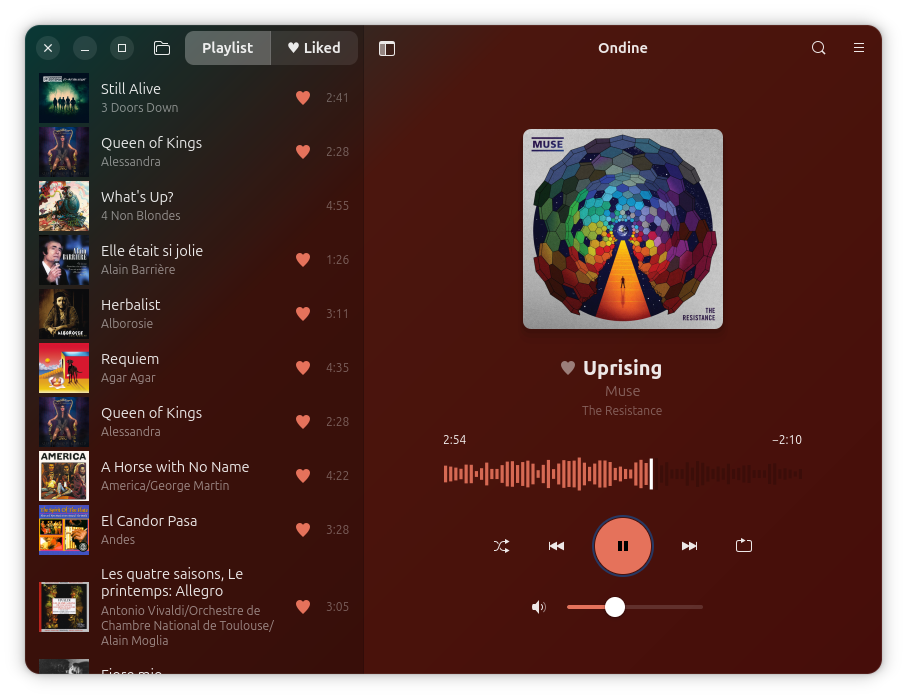
20 native GNOME apps, designed to work beautifully together.



















Built for power users & developers
GNOME is a free, elegant desktop environment loved by millions of Linux users worldwide. But finding apps that truly look and feel native? That's where the Gnome Starter Pack comes in.
We've crafted 20 splendid applications that integrate seamlessly with your GNOME desktop. Built with GTK4 and libadwaita, every app respects your system theme, follows HIG conventions, and feels like it shipped with GNOME itself — because that's the standard power users and developers deserve.
All apps are free and open source (GPL-3.0), available as DEBs, Flatpaks, and AppImages.
Install all apps
Choose your preferred method to install all 20 apps at once, or visit individual app pages to install them separately.
Install via APT (Debian/Ubuntu)
# Add the GPG key
curl -fsSL https://apt.gnomestarterpack.com/gpg.key | sudo gpg --dearmor -o /usr/share/keyrings/gnomestarterpack.gpg

# Add the repository
echo "deb [signed-by=/usr/share/keyrings/gnomestarterpack.gpg] https://apt.gnomestarterpack.com noble main" | sudo tee /etc/apt/sources.list.d/gnomestarterpack.list

# Install all apps
sudo apt update
sudo apt install gnomestarterpackInstall via Flatpak
# Add the Flatpak repo
flatpak remote-add --if-not-exists gnomestarterpack https://gnomestarterpack.com/gnomestarterpack.flatpakrepo

# Install all apps
flatpak install gnomestarterpack info.debuck.GnomeStarterPackAppImage Downloads
Download individual AppImages from the app pages above, or browse all available downloads:
Browse AppImages🤝 Community-Driven Development
Want a new feature or found a bug? Our AI-augmented, human-in-the-loop development process makes it easy to contribute — no coding required.
❤️ Support the project
Gnome Starter Pack is free and open source. If you find it useful, consider supporting development — every contribution helps keep the project alive and growing.